One platform takes a document from the moment it arrives to the moment its data lands in your systems. This page lists what each stage does and which options you can set — in full, not as a summary.
Everything between "an invoice arrived" and "the booking data is in the accounting system": intake, reading, line items, checks on totals, review of the doubtful ones, and delivery.
Everything your team touches: the scan desk, quality flags, queues ordered by service level, keyboard-driven verification, locking, and what happens to exceptions.
What runs where: import connectors, in-process OCR and model runtimes, the workflow engine, export connectors and the admin surface you will operate.
Every stage is configurable and every stage is reachable: REST endpoints, scripts in three languages, plugin extension points and versioned templates you can pin.
Where a document goes at every stage, what is stored about it, who can touch it, and which stages can call an external service — and how to switch that off.
One installation, many clients: each stage below is configured per project inside a tenant and organisation hierarchy, and the review screens embed in your own product.
Fourteen import source types, a browser scan desk and phone capture bring documents in as batches.
upload · REST · mail · SFTP · bus · scanner
Prepare
Pages are deskewed, cleaned and normalised; archives unpacked; office files converted; e-invoice XML lifted out.
deskew · denoise · binarise · unpack
Read
Tesseract, native PDF text, a local model or a remote model — alone or combined — produce text with word positions and confidence.
8 engine modes · 17 barcode types
Understand
Documents are separated, classified and mapped onto a versioned template with typed fields and tables.
16 extraction methods · 30 field types
Verify
Validation rules and confidence decide what a person must look at. The rest passes straight through.
16 rule types · browser hubs
Deliver
Mapped data and document renditions go to fifteen kinds of destination, with retry and a failure policy.
JSON · XML · CSV · XLSX · PDF/A
Everything between the paper and the ERP
The capability list a capture evaluation actually walks through
Ingestion, image processing, recognition, extraction, classification, human review, workflow, export, tenancy, audit and an agent surface — one artifact, one database, one licence-free install. Below is the capability list a capture evaluation actually walks through; each block further down this page goes into the options.
01 · Ingestion
Fourteen ways in
Browser scanning hub, server-side eSCL network scanners, WebUSB direct-attach (experimental), watched folders, IMAP / Gmail OAuth / Microsoft 365 mailboxes, FTP and SFTP with remote globbing, REST sync and async submission, Kafka, AMQP and ZeroMQ, e-invoice intake (UBL, CII, PDF/A-3 attachments, PDF+XML pairs) and paired mobile handsets.
02 · Image & recognition
Sixteen pre-processing steps, three recognition paths
Deskew, despeckle, binarize, crop, line and punch-hole removal, colour dropout and more, ordered per project. Then Tesseract 5, a local GGUF vision model, or one of fifteen named LLM providers — with a hybrid mode that only escalates the words the first pass was unsure about. Barcodes decode through ZXing, not through OCR text.
03 · Extraction
Templates you can reason about, plus a model when you want one
Zones, label search, regex, checksums, datasets and scripts — deterministic and auditable. Table extraction for line items, geometrically or through a grammar-constrained model. Templates can be drafted by a model from a single sample page, then trained from operator corrections, with alternatives per supplier layout.
04 · Human review
A verification hub built for speed, not for screenshots
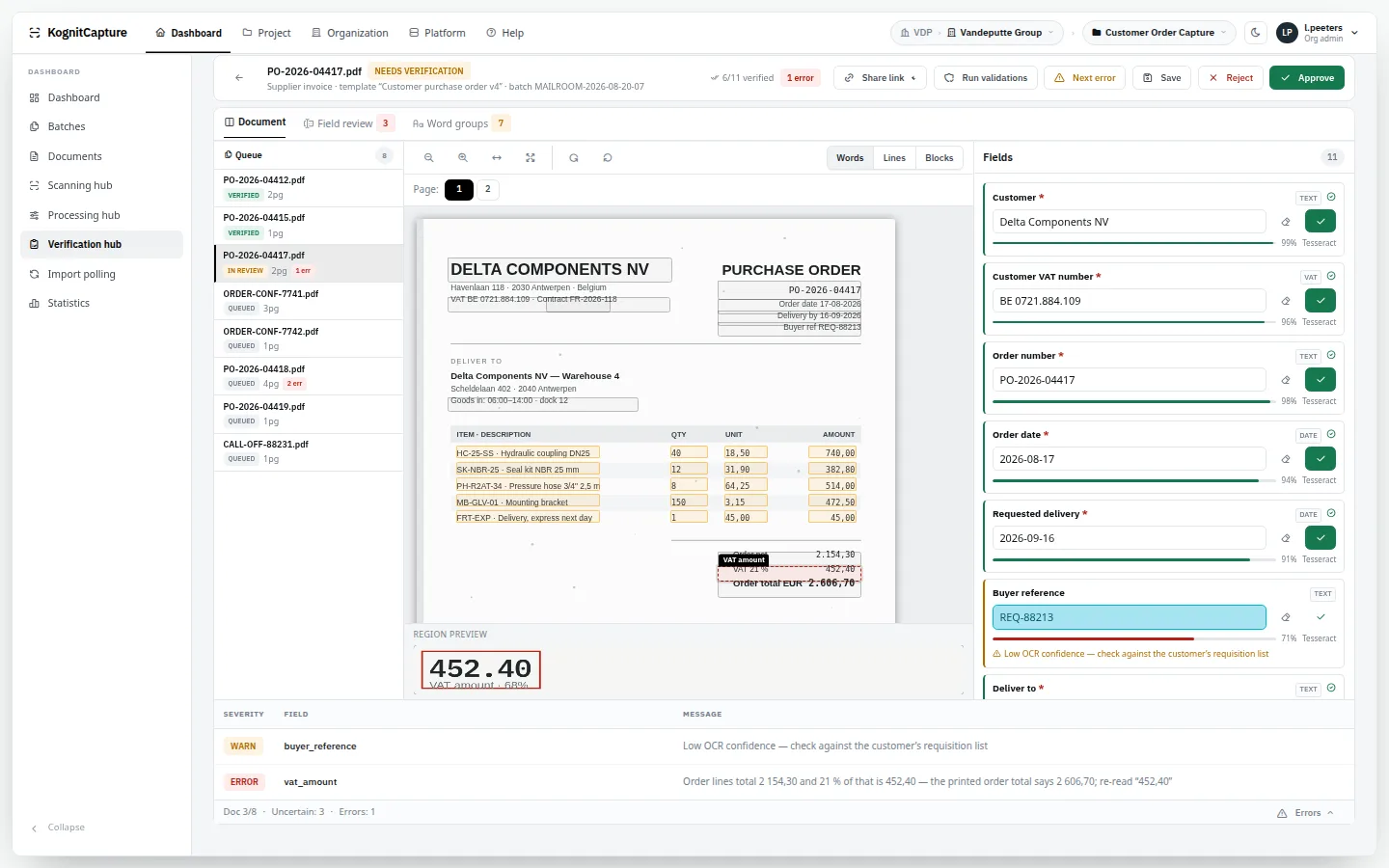
Document mode with page image, zone overlays and hOCR click-to-fill; guided field review for everything low-confidence or invalid; and word groups, where one correction fixes the same misread word everywhere it appears. Validation errors carry severity, field and message. One-time share links let an outsider verify a single document without an account.
05 · Workflow & export
Flow-driven, with real code where you need it
A workflow engine with steps, routing, SLA monitoring and retention; scripting and a plugin SDK for the things no product anticipates. Export to REST, JDBC, file systems, S/FTP, mail and message buses, in eight formats including searchable PDF, PDF/A-2b, multi-page TIFF, UBL and mapped XML.
06 · Platform
Tenancy, clustering and an agent surface with a bouncer
Tenant → organisation → project isolation, roles with per-project hub grants, per-tenant storage prefixes and retention policy. Duty-aware clustering: nodes declare what they are willing to do — import, workflow, export, UI, schedule — and claim work with SKIP LOCKED, so OCR scales separately from delivery. More than a hundred curated MCP tools sit behind OAuth 2.1, scopes, risk tiers and their own audit channel.
Import
Documents arrive the way they already arrive.
No one changes how they send you paper or files. Each project defines its own import sources; every source has a schedule, an active flag, a saved connection and an import profile.
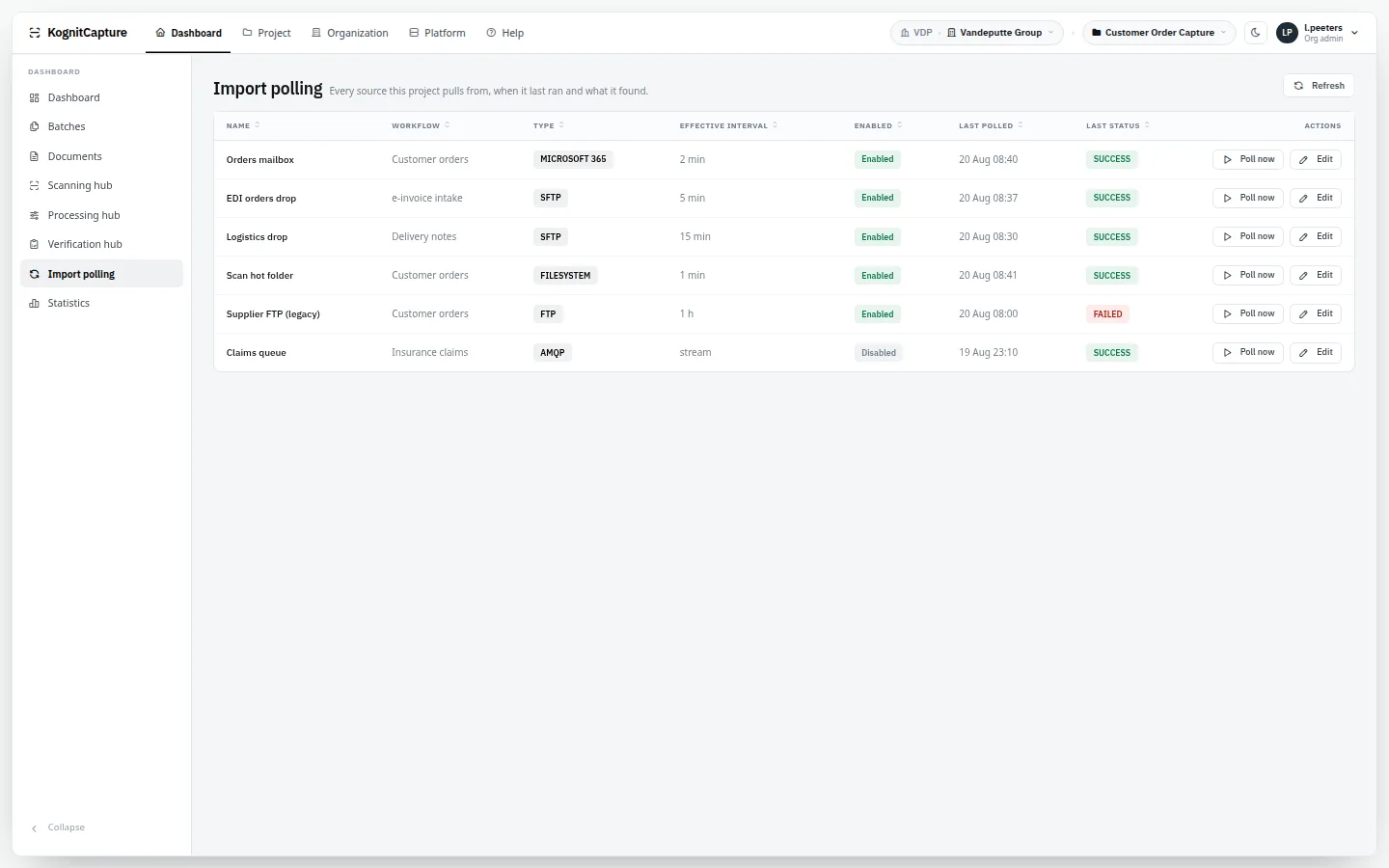
Whatever the channel, the result is the same: a batch of documents entering the project's workflow, with a logged result per polling run.
Email import
Read a mailbox and turn attachments into documents. One batch per email, so an invoice and its annexes stay together. Archives inside attachments are unpacked.
Watch a directory on the server or pull from a remote file server on a schedule. Suits multifunction printers that scan to a share, and partners who deliver by file transfer.
A token URL that accepts multipart uploads from any system, or a REST source that is pushed to or that polls another API.
token URL · push or poll · import profile
Inbound webhook
Let another system notify KognitCapture of a new document. Requests are checked with an HMAC signature and an IP allow-list.
HMAC signature · IP allow-list
Message buses
Consume documents or document references from the event backbone you already run.
Kafka · RabbitMQ · ZeroMQ
Cloud storage
Pull from the storage service a department already drops files into.
S3 · Google Drive · Dropbox · OneDrive · Box
Script, plugin and dataset sources
When none of the built-in channels fit, write the import as a sandboxed script or a compiled plugin, or feed documents from a dataset.
JavaScript · Groovy · Java · plugin SDK
Import profiles
Rules for what an import does with what it finds: how a PDF is paired with its data file, what happens to XML, whether archives are unpacked and office files converted.
pairing: positional / filename / none · XML: reject / embedded PDF / data only · ZIP · 7Z · RAR · patch-code separation
E-invoices on the same intake
Structured invoices are read next to paper and PDF ones: UBL and UN/CEFACT CII with an embedded PDF, and XML carried inside a PDF/A-3. KognitCapture receives and maps these formats; it is not a Peppol access point and does not send invoices.
Peppol BIS / UBL · CII · ZUGFeRD · Factur-X · XRechnung · PDF + XML pairs
Input formats
Images, PDFs, office documents and archives are accepted directly. Office conversion runs inside the application — no LibreOffice to install.
TIFF · PDF · PNG · JPEG · BMP · GIF · PCX/DCX · XPS · DOCX/DOC/ODT · XLSX/XLS/ODS · PPTX/PPT/ODP · RTF · HTML · TXT · XML
Simple capture API
One call for one document when you do not need a workflow: post a file, choose the engine and optionally a pinned template version, get the fields back — synchronously or as a job you poll.
POST /api/capture · sync or async · word confidences optional
Manual upload and batch entry
Operators drop files in the web interface, or send an existing document into a workflow by hand.
batch priority: low → urgent · keep batch together
Import polling. Each polling run of each import source, with its result.From the live demo · synthetic data
Scanning
A scan desk in the browser. Nothing installed.
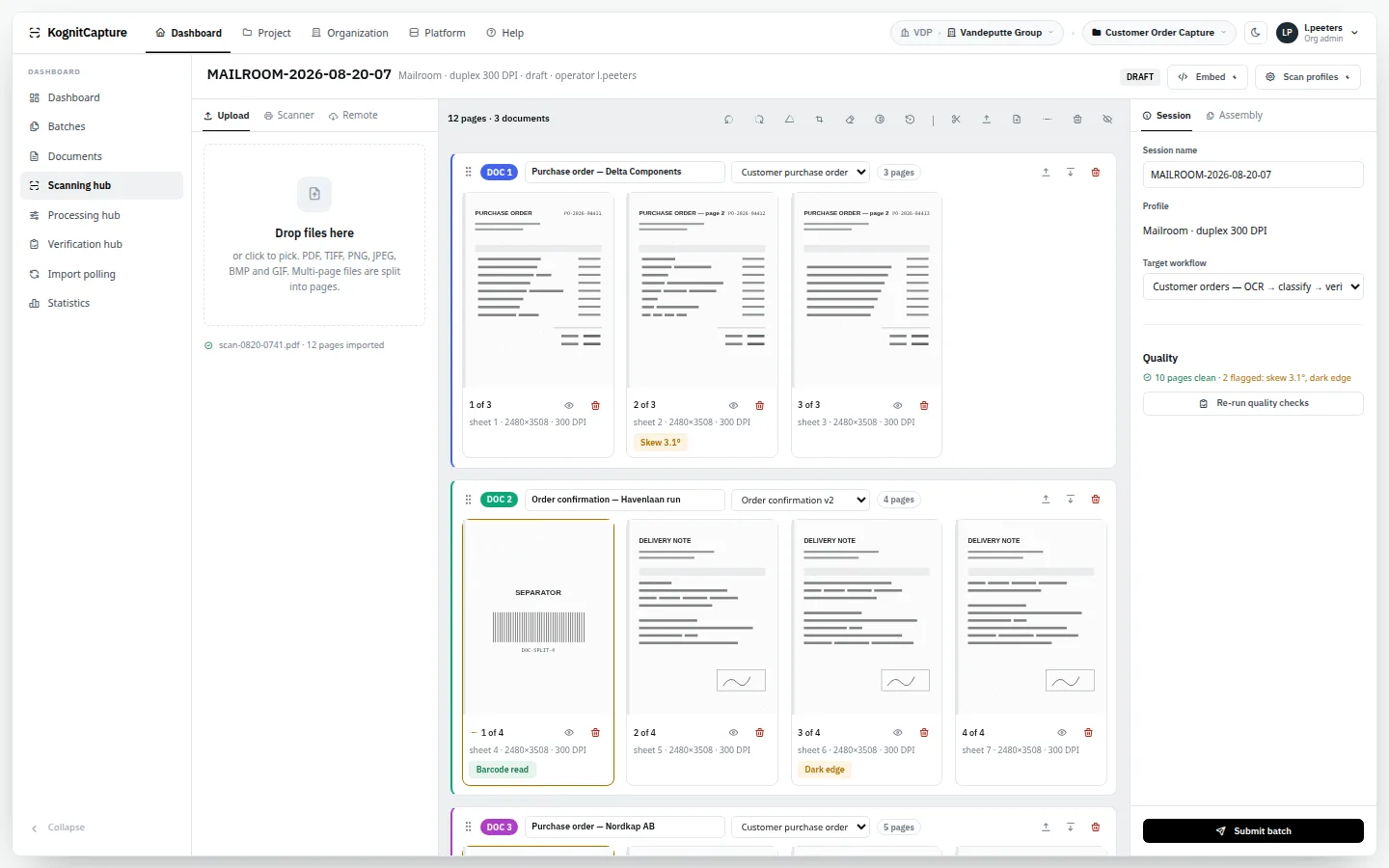
The Scan Hub talks to network scanners from the server and shows the pages in the operator's browser. There is no driver, no desktop client and no local software to keep patched on the scanning PC.
Classic TWAIN and ISIS drivers are deliberately not supported. If your estate depends on them, scan to a folder and let a hot-folder source pick the files up.
Driverless network scanning
Scanners that speak eSCL (AirScan / Mopria) are discovered by the server and driven from the browser. USB scanners through WebUSB work in Chromium browsers and are still experimental.
Problems are caught while the paper is still in the operator's hand, not three steps later in a verification queue.
blank · skewed · too dark · too light · low resolution · truncated · upside down · blurry · glare
Other ways into a session
The same session accepts uploaded files, a pull from a saved connection, and pages photographed on a phone.
upload · SFTP / FTP / mail pull · phone
Phone capture
A capture page served by the platform, opened in the phone's browser by scanning a QR code. It outlines the page, scores focus and can release the shutter by itself. Devices are paired individually and each key can be revoked.
QR pairing · fleet token · auto-shutter · longest side · JPEG quality · revocable device keys
Patch codes and separator sheets
Physical separator sheets split a stack into documents at import or at the scan desk.
patch 1 · 2 · 3 · 4 · 6 · T
Embeddable
The Scan Hub can run inside your own application in an iframe, opened by a server-side session. See the developer page.
API key · short-lived session · origin allow-list
Scanning hub. A server-side scan session with the page assembly board, scanners and scan profiles.From the live demo · synthetic data
Recognition
Read the page locally. Call a model only when you choose to.
Recognition runs inside the application. Tesseract engines are pooled and kept warm; text that is already in a PDF is taken from the PDF instead of being re-read from pixels.
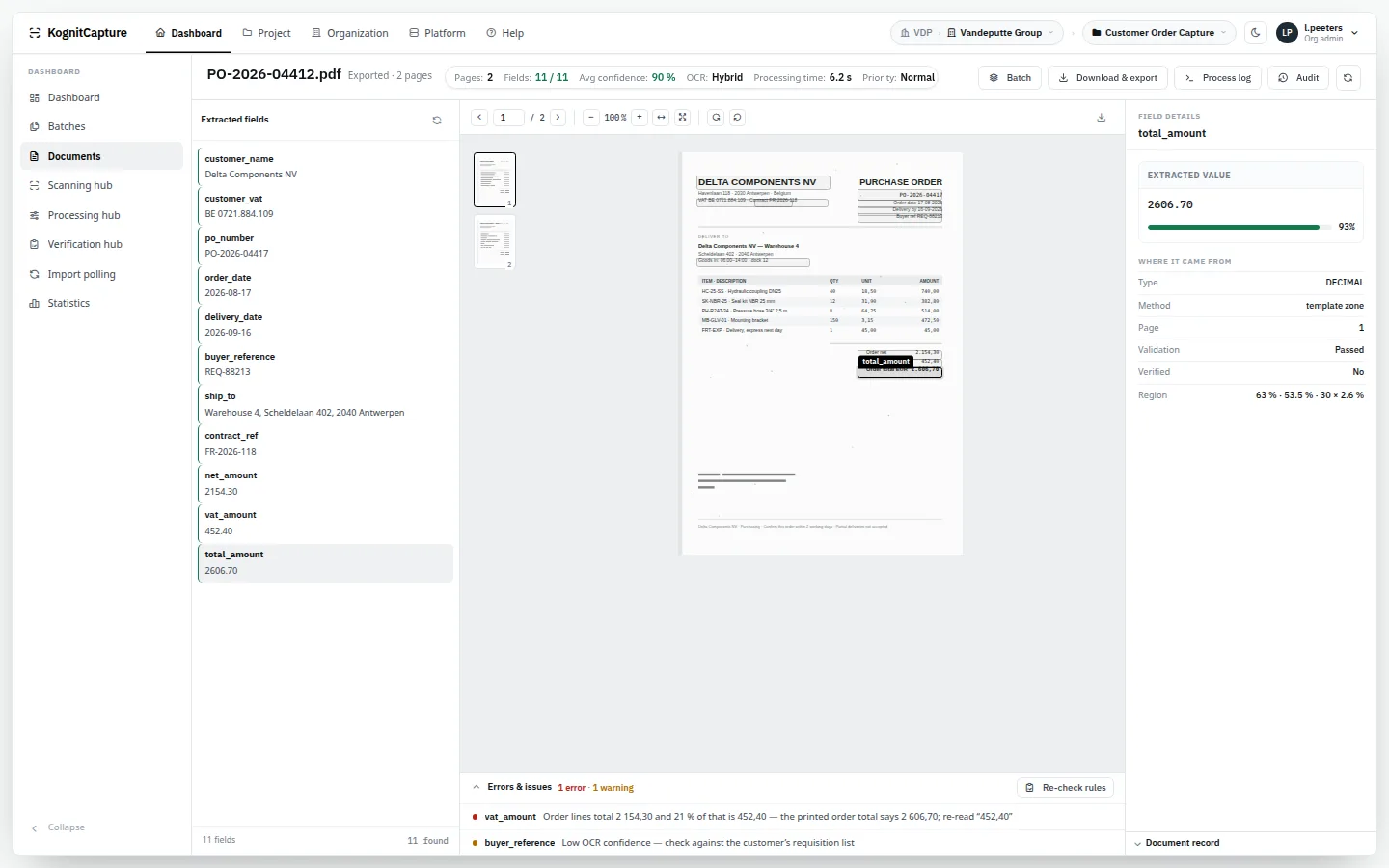
Word positions and confidence are stored for every word. That is what makes click-to-fill in the review screen, and an exact text layer in searchable PDFs, possible.
Eight engine modes
Choose per project, per template or per call how a page is read: classic OCR, a vision model, both with the model checking the OCR, or the PDF's own text with OCR only where it is missing.
Tesseract · LLM · hybrid · PDF native · PDF native + hybrid · open data loader (+ hybrid, + OCR)
Hybrid escalation
In hybrid mode the cheap pass goes first. Only the words or pages it was unsure about are re-read by a model — so you pay model time, or tokens, for the difficult fraction instead of for every page.
Tesseract first · model on low confidence
Language packs on demand
Install the languages you need from the administration page — around 129 are available upstream — in standard, best or fast quality. Several languages per document, with language detection.
standard / best / fast · multi-language · detection
Train your own language pack
For a typeface or character set the stock packs read badly: build a training set, transcribe lines, train, and compare character and word error rates before and after. Nothing is installed until you say so.
fine-tune base · fine-tune run · new characters · from scratch · CER / WER
Image pre-processing
Pages are straightened and cleaned before they are read. Settings are kept in profiles and applied per project or per template.
Upside-down and sideways pages are corrected automatically, or only flagged if you want a person to decide.
off · correct · flag only
Recognition output
Take the raw result as well as the extracted fields.
full text · hOCR · ALTO XML · word boxes · word confidence · alternative readings
Measure it yourself
An accuracy harness compares extraction against ground truth that you supply. We publish no headline accuracy figure: results depend on your documents, which is why we propose a bake-off on yours.
your ground truth · per template
Handwriting
There is no separate handwriting engine. Handwritten fields are read through a vision model when you enable one, and are a natural candidate for human review.
vision model only
Document view. Recognised values with their position on the page, confidence and history.From the live demo · synthetic data
AI models
Model-agnostic. Local first. Remote if you decide.
Cloud AI is priced by the token and reads every page you send it. Here the model is a component you place: inside the installation, on your own model server, or with a provider — per step.
Language models are an option at several stages, never a requirement. A model can run inside your own installation, so pages never leave it; or you can configure a remote provider per organisation.
Every call is logged with its cost and latency, and one monthly ceiling per organisation can warn or block.
Local models
Text models in GGUF format run inside the application process. Vision models run through a local model server that the platform manages on the same host. Models load on first use, are evicted when idle and stay inside a memory budget.
GGUF · lazy load · idle eviction · memory budget · on/off per platform and organisation
Remote and self-hosted providers
Fifteen named providers, any OpenAI-compatible endpoint, and further providers through a plugin.
Anthropic · OpenAI · Google Gemini · Mistral · Ollama · LM Studio · vLLM · LocalAI · Jan · GPT4All · AnythingLLM · OpenChat · IBM Bob · Moon AI · plugin
Per-provider settings and failover
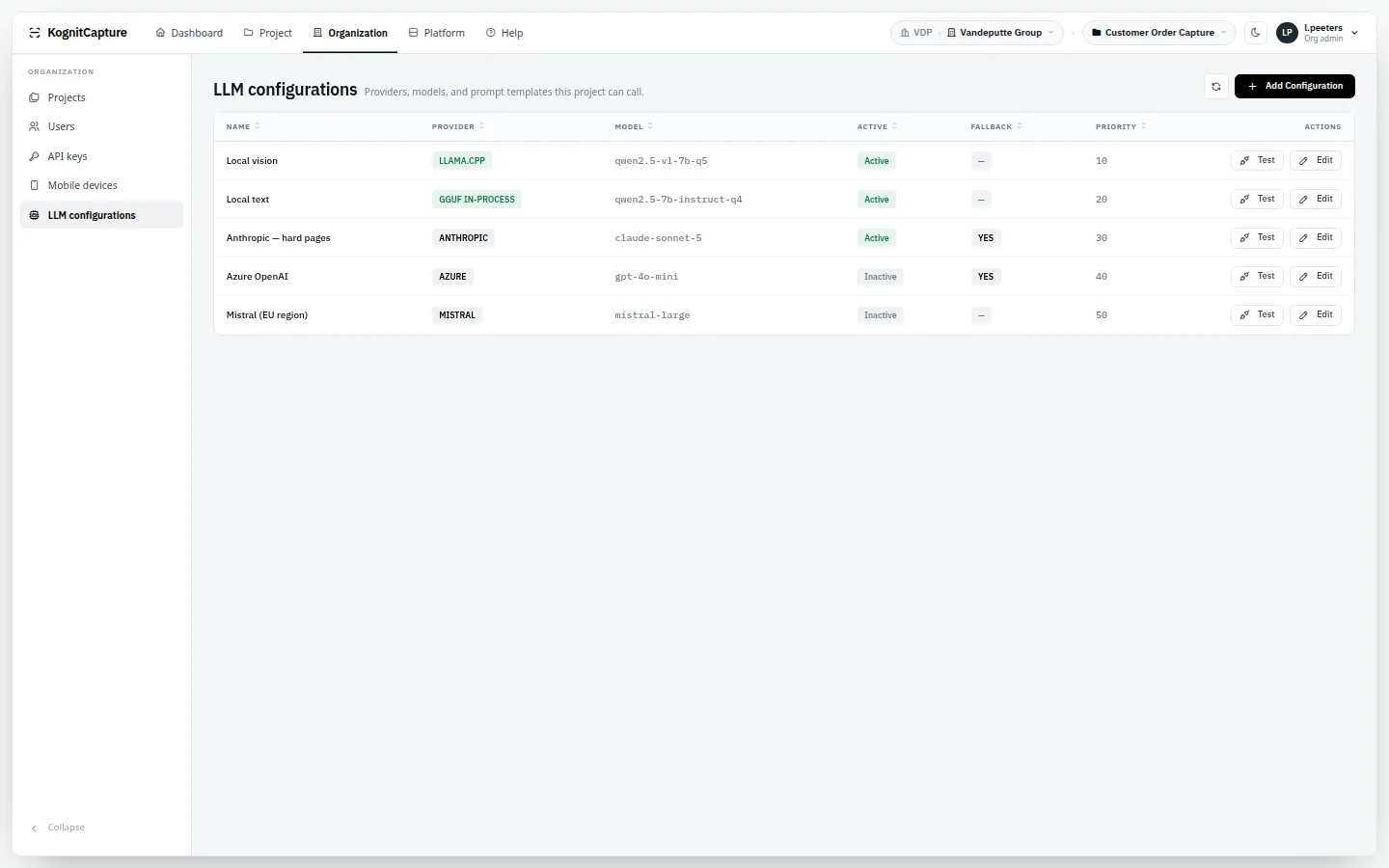
Each configured provider has its own model, limits and priority. If one fails, the call falls over to the provider marked as fallback.
model · max tokens · timeout · retries · priority · fallback · cost per token
Where a model can help
Reading a page, checking OCR output, classifying, checking a classification, extracting fields into the template's own structure, and proposing a template from one sample page.
AI OCR · verify with AI · classify with AI · verify classification · structured extraction
Assistants for the people who configure
Help writing scripts and plugins, suggesting XML and field mappings, setting up connections, and turning a question in plain language into a report query.
script · plugin · mapping · connection · report
Prompt control
Prompt templates can be overridden per organisation and per workflow step. You choose which pages and which image tiles are sent.
A price book, a log of every call with cost, latency and status, usage and cost pages, and a monthly ceiling per organisation.
price book · p50 / p95 latency · ceiling: warn or block · batch jobs
What to know before enabling a remote provider
When a step uses a remote provider, the pages you scope for that step are sent to it. There is no automatic redaction of personal data before the call. If that is not acceptable, use a local model or leave the step out.
your choice per step · local alternative always available
LLM configurations. Local and remote providers with model, priority, fallback and cost.From the live demo · synthetic data
Classification & separation
Know what a document is, and where it ends.
A stack of mixed mail has to become individual documents of known types before any field can be extracted. Both steps are configurable and both can be tested before they go live.
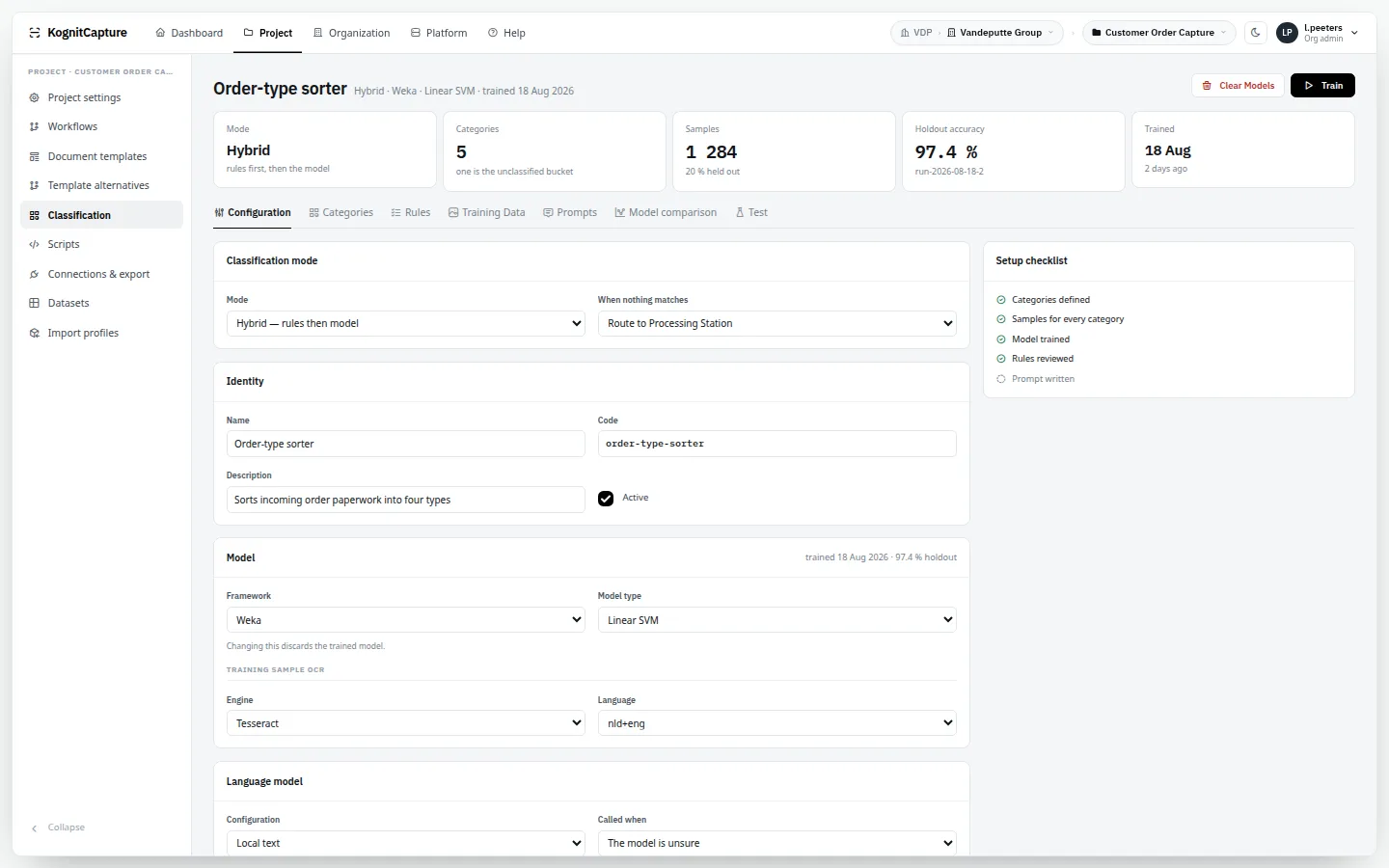
Four classification modes
Statistical models trained on your samples, a language model, rules on keywords and datasets, or a hybrid. Each category maps to a template.
Four frameworks and 29 model types run inside the application. No external inference service, no data leaving for training.
Weka · Tribuo · OpenNLP · Smile
Train, test, compare
Manage training samples, run tests, compare models side by side and review predictions before a model is used on live work.
samples · test runs · model comparison
Document separation
Split a batch into documents on any of six rules. The parent-child relation is kept, so you can always trace a document back to the scan it came from.
fixed page count · blank page · barcode match · model detection · patch code · template header / footer
Learning from corrections
When an operator corrects a class or a field, the correction becomes a training sample. A retrained model replaces the current one only if it passes a regression gate, and every learning event can be undone.
off · collect · auto · inherit · champion / challenger · undo per event
Classifier. Categories, training samples and test runs.From the live demo · synthetic data
Templates & extraction
Templates that are configured, not commissioned.
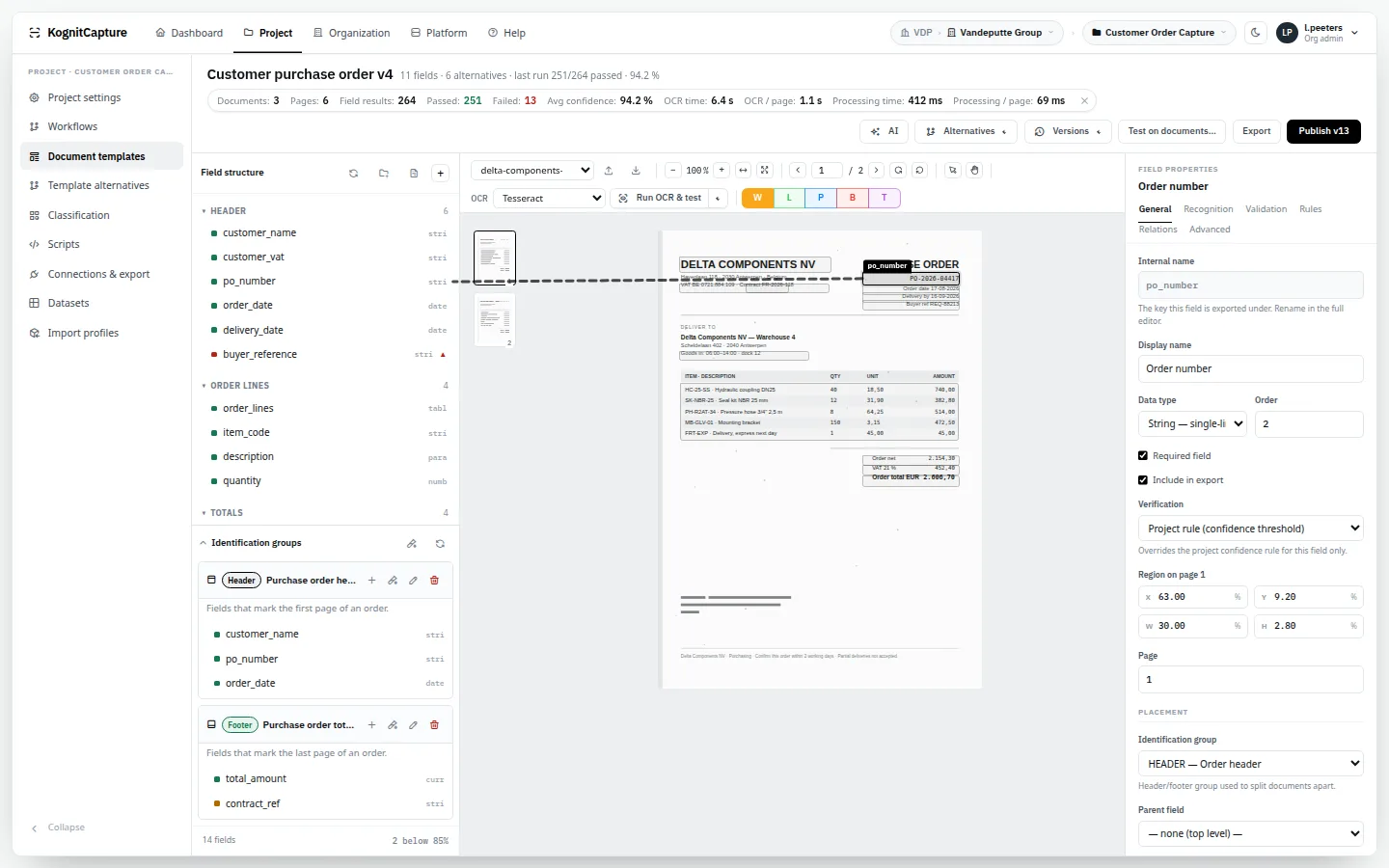
A template describes the fields you want and how each one is found. You draw it on a sample page in the browser. A new document type is a configuration task for a designer, not a change request to a consultant.
Blueprints give you a head start: a complete project with workflow and a fully fielded template, created in one step.
Sixteen extraction methods
Per field, choose how the value is found — and combine methods across a template. A fixed zone for a form, a label search for an invoice, a model for the awkward ones.
zone · label search · regex · keyword proximity · anchor text · text value · LLM · script · companion file · XML mapping · plugin · dataset lookup · classification · language detection · validation rule · manual
Thirty field types
Typed fields that know what they hold, so validation and export formatting follow from the type.
string · paragraph · number · currency · date · phone · boolean · checkmark · checkmark group · list · table · group · repeating group · barcode · picture · named entity
Tables and line items
Invoice lines, container lists, transaction rows: column zones, row grouping, header detection and continuation across pages.
column zones · row grouping · header detection · multi-page
Visual template designer
Draw zones on a sample page, anchor them to text that moves, read a value by pointing at it, and test each field against real documents before publishing.
anchored zones · read by pointing · field presets · per-field test runs
Alternatives per supplier
One logical template, several layout variants. Fifty suppliers with fifty invoice layouts still produce one field set downstream. A discriminator field picks the variant, and variants can be trained from sample PDFs.
layout variants · discriminator field · train from samples · optimise
Versioning and pinning
Publishing a template takes a snapshot. A workflow step or an API call can pin a version, so a designer changing the template never breaks a live integration. Any version can be reverted to.
publish · pin · revert
Blueprints
More than twenty industry starter kits create project, workflow and template in one step. The field sets are authored for the document type; they are a starting configuration, not a pre-trained model.
Load master data — suppliers, cost centres, customers — and use it to look up, autofill and validate extracted values, in scripts and in classification rules.
CSV · JSON · XML import · lookup · autofill
Companion data and XML mapping
Take values from a sidecar file delivered with the document, or map an XML payload onto the template with XPath and XSLT. Several XML dialects are detected and mapped onto the same fields.
Compare what was read from the page with what a second source says — the embedded e-invoice, a sidecar, a dataset — and get a verdict per field.
matched · fuzzy · not found · skipped
Normalisation and patterns
Clean values as they are extracted: a pattern library with a test lab, replacements and value normalisation.
regex library · regex lab · replacements
FlexiCapture 12 project import
Upload an exported project and get a project, template with fields and rules, datasets, scripts, classifiers, alternatives and a draft workflow. FlexiLayout descriptions do not transfer and have to be redrawn.
project zip → draft configuration
Template designer. Zones drawn on a reference page, with the selected field's properties.From the live demo · synthetic data
Validation
Rules decide what a person has to look at.
Straight-through processing is only safe when something checks the data. Sixteen rule types, each with a severity of error or warning, run before a document is allowed past review.
Field rules
The basics, set per field without writing code.
not empty · length range · value range · value list · regex · date range · checksum
Rules across fields
Net plus VAT equals gross. Line totals add up to the invoice total. Due date is after invoice date.
compare field · arithmetic · expression
Rules against your own data
Does this supplier exist? Is this purchase order open? Ask a dataset, a database or another system.
Anything the built-in types do not cover, as a script; plus a replace rule that fixes a known pattern instead of flagging it.
script · replace
Severity drives routing
An error stops a document and sends it to review. A warning is shown to the reviewer but does not block. The workflow can branch on "validation passed" and "validation failed".
error · warning
Validation in the verification hub. The rule that stopped the document, with severity, field and message.From the live demo · synthetic data
Workflow
The drawing is the workflow.
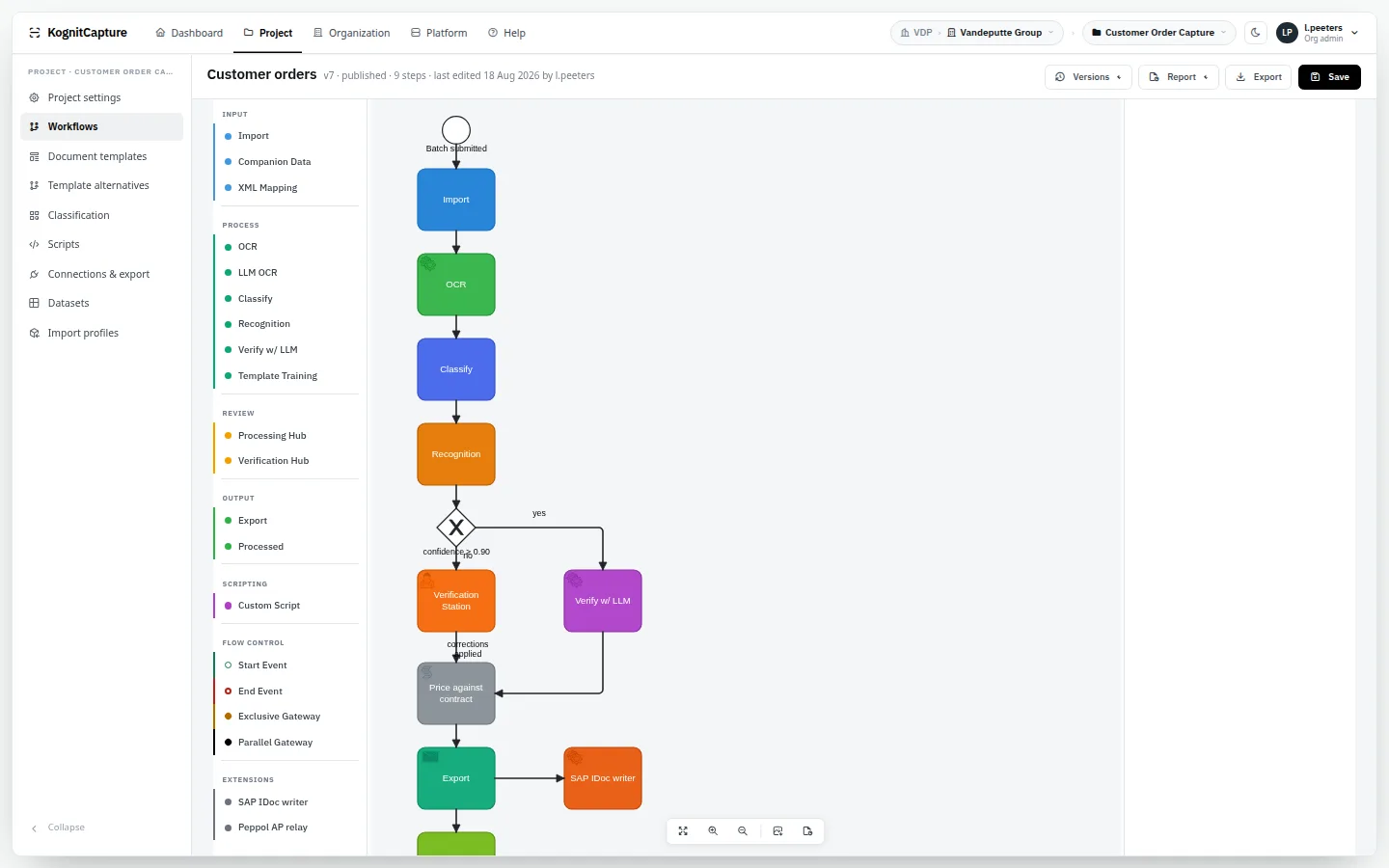
Workflows are drawn in a BPMN-style designer in the browser. What you draw is what runs — there is no second, hidden configuration to keep in step with the picture.
A workflow is linear with decisions: a document follows one path at a time. Parallel branches and joins are not supported.
Twenty-one step types
The building blocks, in the order a document usually meets them.
import · OCR · AI OCR · classify · classify with AI · verify classification · recognition · verify with AI · verification hub · processing hub · template training · auto-learn · companion data · XML mapping · cross-check · embed · export · route to workflow · custom script · plugin · processed
Routing on outcomes
Each connection between steps has a type. Send low-confidence documents to a person and high-confidence ones straight to export.
success · failure · low / high confidence · timeout · manual override · validation passed / failed · classification match · template match · rule · conditional · always
Conditions on the data
Branch on field values, confidence, validation result, category, template and document properties, with seventeen operators.
Track a batch through every step, set its priority, keep its documents together, and reprocess, retry or quarantine it. A callback can tell the sending system when it is done.
Set targets per project for documents and batches, with limits per stage and an at-risk threshold. Review queues can be ordered by deadline, and alerts and digests go out by email.
Put your own logic in the middle of a workflow. See the developer page for languages, sandboxing and the SDK.
JavaScript · Groovy · Java · compiled plugins
Workflow designer. The drawing that runs: steps, gateways and routing.From the live demo · synthetic data
Human review
People check what needs checking. Nothing more.
Review happens in the browser, in hubs built for speed: the page image beside the fields, keyboard first, with the reason a document was stopped in plain sight.
Who may open which hub is granted per user, for one project or for all.
Verification Hub
A queue with confidence indicators. Open a document and see the page beside its fields; click a word on the page to fill a field; move through fields from the keyboard. Each field shows how it was extracted and how sure the engine was.
Document mode shows the page with zone overlays and click-to-fill. Guided field review walks only the fields that are low-confidence or invalid. Word groups collect the same misread word wherever it appears, so one correction fixes all of them.
document · field review · word groups
Fix structure, not just values
Add or remove a field, change the template or the document type, and ask a model for a second opinion on a field without leaving the screen.
add / remove field · change template · change type · AI assistance
Processing Hub
Everything in flight. A live picture of the workflow shows how many documents sit at each step; release, reject or re-run them from there.
live workflow view · release · reject · re-run
Check-out locking
Two operators never work on the same document. Locks can cover a document or a whole batch, expire by themselves, and can be released by an administrator.
document or batch mode · time to live · force check-in
A trail for every field
The raw recognised value, the value after rules, each amendment, who verified it and when. If an auditor asks where a number came from, the answer is on record.
raw value · amendments · verifier · timestamp
Public review links
Ask someone outside the organisation — a supplier, a client — to check one document without giving them an account. Links do not expire by time today, so treat them as you would a shared document link.
single document · no account
Embedded hubs
Put the Verification Hub inside your own application. Your server opens a session with an API key; the hub loads in an iframe on an allowed origin and reports events back to the page.
Filter by file name, batch, status, date and confidence. Order by service level, priority or arrival.
filters · SLA-first · priority-first · FIFO
Verification hub. Queue, page with zone overlays, fields with confidence, and the validation panel.From the live demo · synthetic data
Export
Delivered where the data is needed, in the shape it is needed.
An export goal says where the result goes, in which format, and which fields are included. A workflow can have several. Fields you do not map are not sent — by design.
There are no named connectors for specific ERP or accounting products. Integration is through the generic channels below, which is how most of those products accept data anyway.
Fifteen destination types
Push to an API, write to a database or a file server, publish to a bus, send by mail or to a chat channel.
Deliver the document as well as its data. Searchable PDFs are built from the stored word positions, so the text layer sits exactly under the image. PDF/A files are written to the standard's rules; we do not run a third-party conformance validator on them.
PDF · searchable PDF · PDF/A (1B–3A) · searchable PDF/A · multi-page TIFF
PDF options per goal
Protect, sign, stamp and number what you send out.
password (AES-256) · metadata or strip · digital signature (PKCS#12) · MRC compression · stamping · redaction · Bates numbering
Retry and failure policy
Exports go through a scheduled queue with retry. Per goal you decide whether a failure stops the document or lets the other goals continue.
queue · retry · fail / continue
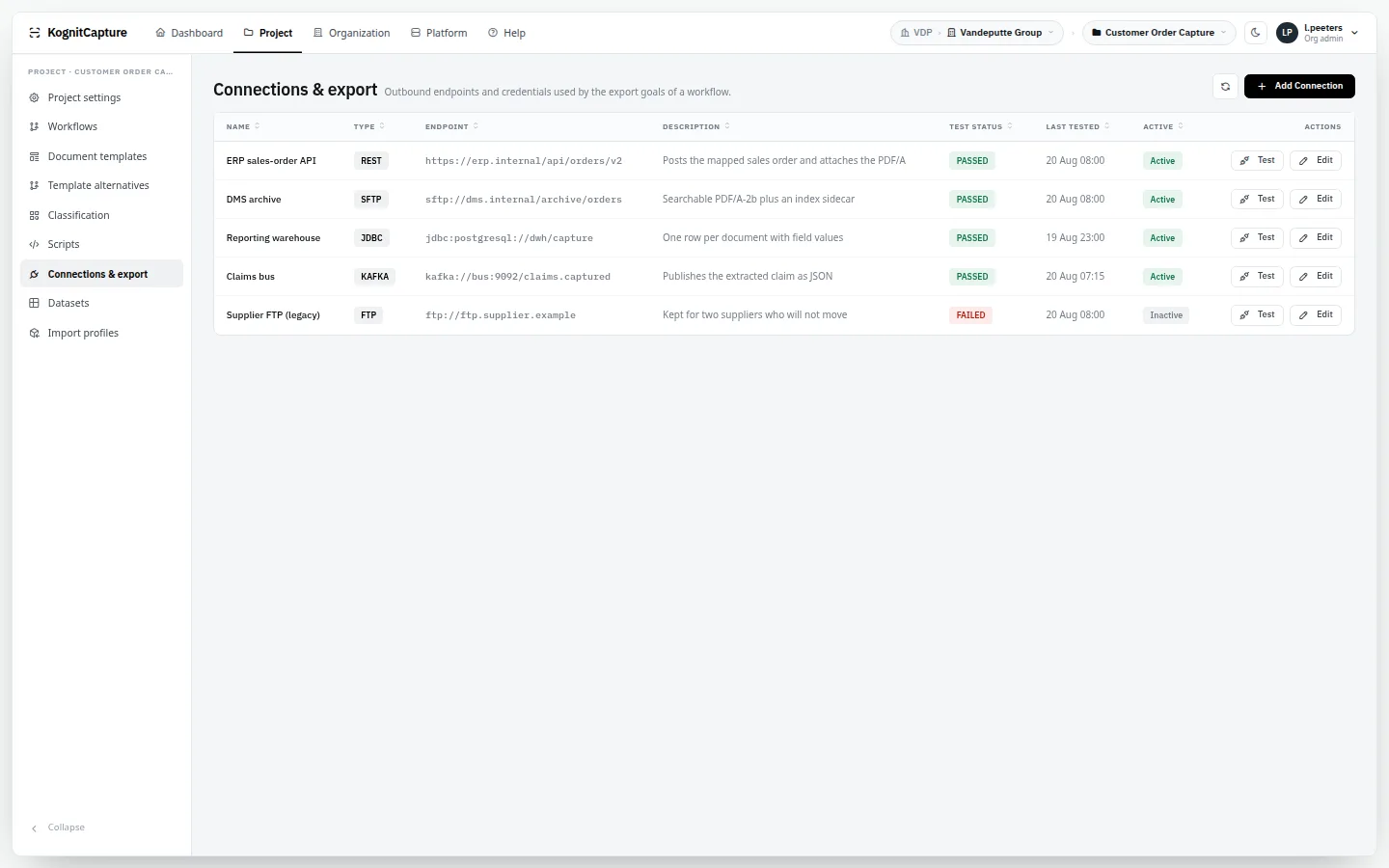
Saved connections
Define a connection once, test it with a button, and reuse it across imports and exports. Credentials are kept in an encrypted vault.
An Embed step cuts documents into chunks with page, position and confidence attached, and writes them to a vector store. A search endpoint queries them back.
Know how the operation is doing without asking anyone.
Standard reports cover throughput and effort. A report designer covers the question nobody anticipated.
Five standard reports
Throughput, processing times, per-operator figures, process efficiency, and efficiency trends across sixteen metrics with a verdict on the direction.
throughput · processing times · per operator · efficiency · trends
Report designer
Build a report from a visual builder, from SQL, or by describing it to the assistant.
builder · SQL · AI assistant
Scheduled delivery
Reports arrive by email on a schedule.
CSV · XLSX · PDF
Project report
The complete configuration of a project as a document — for change control, audits and handover.
HTML · PDF · Word · ODT
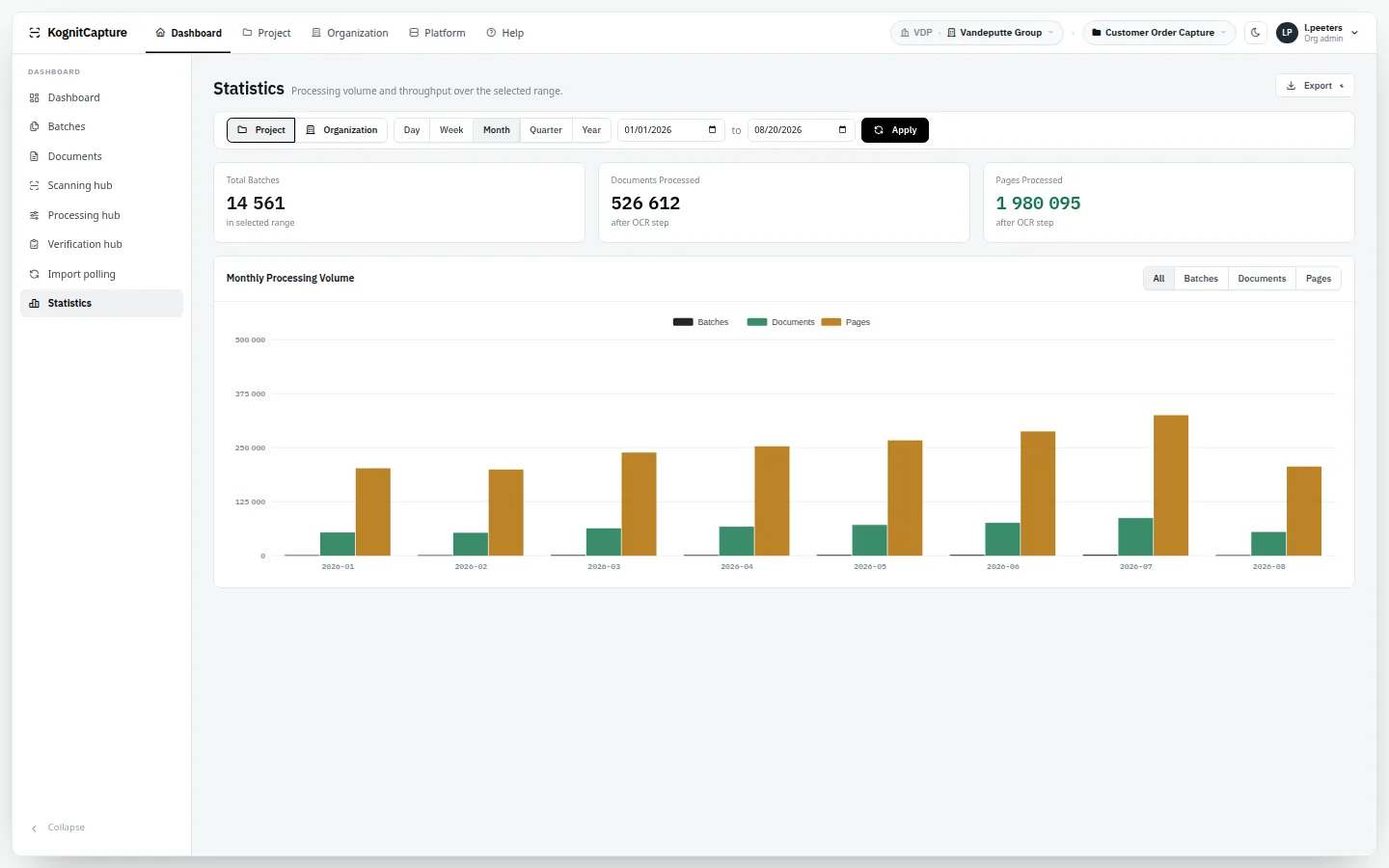
Dashboards and runtime pages
A dashboard and statistics page for the business; AI cost and usage, engine pool and memory pages for the people running it.
dashboard · statistics · AI cost · engine pool · memory
Statistics. Throughput, processing times and operator figures.From the live demo · synthetic data
Administration
One installation. Many clients. Their name on the door.
Three levels — tenant, organisation, project — separate clients, business units and document flows. Storage directories follow the same hierarchy on disk.
Tenant → organisation → project
A service provider hosts many clients; a group hosts many business units. Each has its own projects, templates, operators and exports. A context switcher moves an administrator between them.
three levels · nested storage per level
White-labelling
Set product name, tagline, logo, colours, typeface, sign-in page and footer links at platform, tenant or organisation level. Each setting inherits from the level above unless overridden.
name · logo · colours · typeface · sign-in page · per-field inheritance
Own domain per client
Tenants and organisations can be reached on their own domain names and portal addresses.
domain names · portal addresses
Mail providers per level
Outgoing mail through the provider each client prefers.
SMTP · Gmail · Microsoft 365 · Outboundly · Mailfence · Infomaniak · Proton Mail · plugin
Six roles plus hub grants
Superadmin, tenant admin, organisation admin, designer, verifier and user. Access to the scan, mobile capture, processing and verification hubs is granted separately, per project or for all projects.
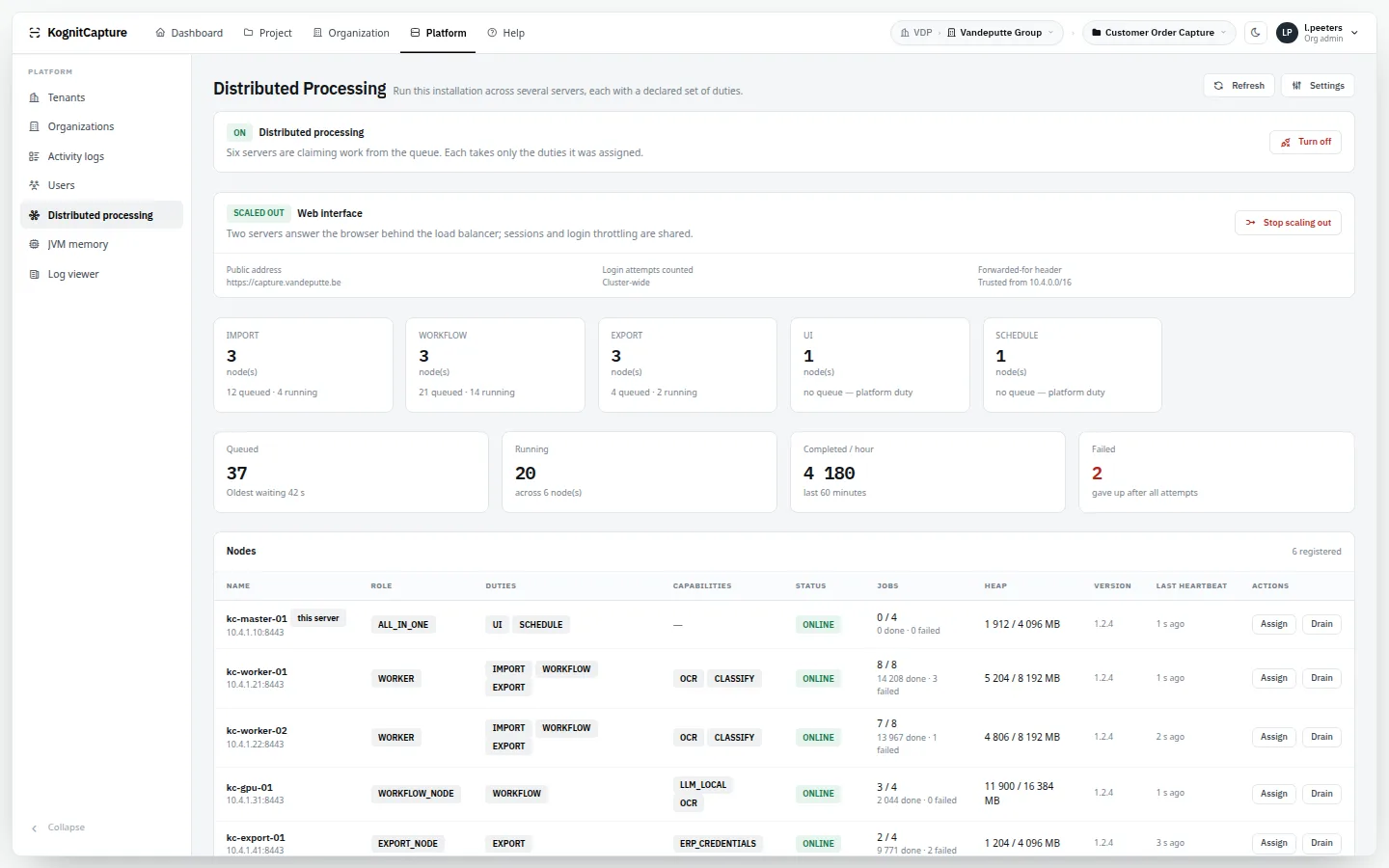
Add nodes that share one PostgreSQL database and one filesystem. No message broker to run: nodes claim work from the database queue without contention, so OCR scales separately from delivery. Give a node duties and capabilities — dedicate one to OCR, another to export — and shut one down gracefully; interrupted work is recovered.
Built-in end-to-end scenarios test the running installation and show the result on a dashboard at platform, tenant and organisation level. A nightly sweep can be switched on, with alerts when the state changes.
scenarios · nightly sweep · alerts
Operations pages
A setup wizard, platform settings in twenty groups, a log viewer, log retention per level, language packs, plugin libraries, the credentials vault and the device roster.
Distributed processing. Nodes with their duties and capabilities, and the work each has claimed.From the live demo · synthetic data
Straight talk
What is honest to say about the newest parts.
01Line-item extraction is new code. It works, and we insist on a bake-off against your real invoices before anyone promises accuracy.
02Blueprints ship pre-authored field sets, not pre-trained models. They give you a running project, not day-one accuracy.
03The mobile lane — pairing, per-device revocable keys, fleet enrolment — is complete on the platform side, with a capture page in the phone's browser; the native handset camera client is not shipped yet.
04Throughput is yours to measure. We publish no pages-per-hour figure; it depends on your hardware and your paper, and we benchmark it before quoting volume.
We would rather you read that here than discover it in week three.
Where it is not the right answer
We would rather tell you now.
01You need a certified, native connector into one specific ERP. KognitCapture integrates through REST, databases, files, mail and message buses — not through product-specific adapters.
02Your scanner estate depends on TWAIN or ISIS drivers and scan-to-folder is not an option.
03Your procurement rules require a vendor SOC 2 or ISO 27001 attestation. We do not hold one. You host the software, so your own controls apply.
04You expect top accuracy on day one with no configuration. Templates and rules are what make extraction reliable; blueprints shorten that work, they do not remove it.
See these stages run on your own documents.
A scoped bake-off on your worst pages, with a field-level report.Request a demo →